
Sign in with an API key
Sign in the Screel plugin with an API key instead of the browser. An editor that runs a scripted job can then link, sync and render on its own. A job is a Python script that drives the plugin; see Scripting the plugin.
Create a key
Section titled “Create a key”- In Screel, open Settings → API keys.
- Choose New key.
- Enter a Name for the key.
- Keep Every project you can reach on, or turn it off and pick the projects the key can use.
- Choose Create key.
- Copy the key. This is the only time Screel shows it.
For an organization key, open API keys in the organization settings instead.
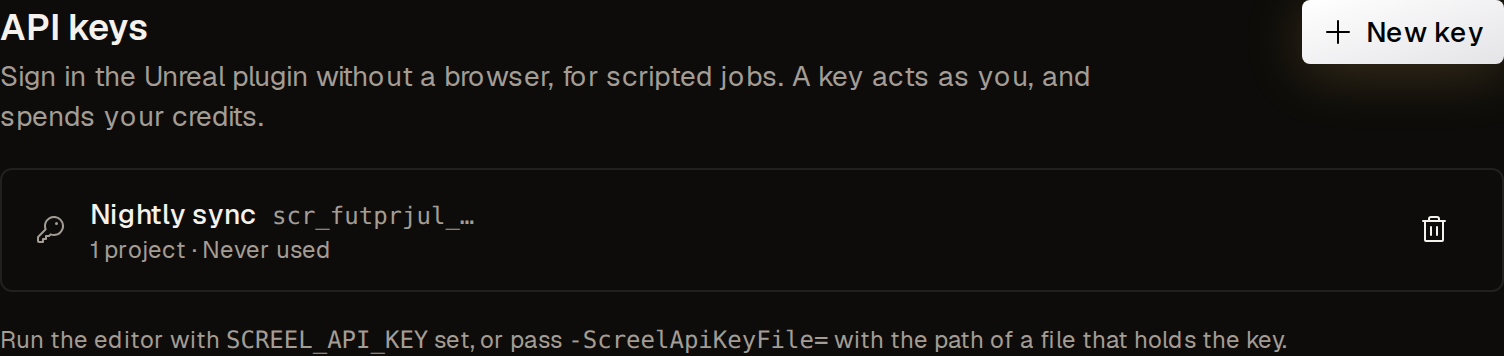
A key starts with scr_. A personal key acts as you and uses your credits. An organization key acts as its own member of the organization and takes a seat. Only organization owners and admins can create one. A key never gets more than edit access, and it reaches only the projects you picked.
The API keys list shows each key with its projects and when it was last used. The trash button revokes a key after you confirm with Revoke. An editor that uses the key stops at its next request.
Use the key in Unreal
Section titled “Use the key in Unreal”Give the key to the editor in one of two ways:
- Set the environment variable
SCREEL_API_KEYto the key before the editor starts. - Start the editor with
-ScreelApiKeyFile=<path>, where the file holds only the key.
The plugin takes no key on the command line itself, because Unreal writes its command line to the log.
At launch, the plugin signs in with the key. It opens no browser and stores no token on disk. In Python, is_signed_in() turns true once the sign-in finishes, and is_signed_in_with_api_key() is true as well.
This example starts the editor with a key file and runs a job script:
UnrealEditor.exe "C:\Projects\Canyon\Canyon.uproject" -ScreelApiKeyFile="C:\Secrets\screel-key.txt" -ExecCmds="py C:/Jobs/sync_and_render.py"The sign-in finishes on a later editor tick, so a job script must wait for it. Put the job’s calls in run_job, such as the steps of the scripting example:
import time
import unreal
TIMEOUT_SECONDS = 60
lib = unreal.ScreelEditorLibrary

def run_job():    unreal.log(f"Signed in with a key: {lib.is_signed_in_with_api_key()}")

class WaitForSignIn:    def __init__(self):        self.deadline = time.monotonic() + TIMEOUT_SECONDS        self.handle = unreal.register_slate_post_tick_callback(self.tick)
    def tick(self, delta_seconds):        if lib.is_signed_in():            unreal.unregister_slate_post_tick_callback(self.handle)            run_job()        elif time.monotonic() > self.deadline:            unreal.unregister_slate_post_tick_callback(self.handle)            unreal.log_error("Screel did not sign in.")

waiter = WaitForSignIn()
What a key session cannot do
Section titled “What a key session cannot do”- Screel cannot send commands such as Open in Unreal, Recapture or Render in Unreal to the editor. The editor has no realtime connection.
- The editor reaches only the projects of the key.
- Sign out ends the key session until the editor restarts.
When Screel refuses the key, the log reads “Screel refused the API key” and the editor stays signed out. When Screel cannot be reached, the plugin tries again after 5 seconds, and then waits longer each time, up to 2 minutes.