
Narration
Generate a scene’s spoken line in the Narration tab, or upload your own recording.

Each scene has one caption. Screel speaks it as the narration and, with Captions on, shows it on screen as the subtitle. To change how captions look in the video, see Render and exports.
Generate narration
Section titled “Generate narration”- Select a scene.
- Click Narration.
- Write the line.
- Pick a voice and a style.
- Press Ctrl/Cmd+Enter, or click the generate button.
The scene needs text but no still. A line holds up to 200 spoken characters. Audio tags do not count. @ mentions are off in this field, because Screel speaks the text as written.
Generate again for a new read. To use your own recording, click Upload in the composer footer. Earlier versions stay in History.
Editing the text does not change the audio. Generate again after you edit a line.
If you remove the narration, the caption stays and the scene renders silent.
Voices and styles
Section titled “Voices and styles”The voice menu lists 30 voices, each with a character, such as Puck · Upbeat. Search it with Search voices…. Screel reads the language from your text, so there is no language setting.
The style sets the overall delivery of the line:
- Natural
- Dramatic
- Cheerful
- Warm
- Documentary
- Whispered
- Excited
- Conversational
Screel saves the voice and the style on each scene.
Audio tags
Section titled “Audio tags”An audio tag changes how Screel performs the words after it. Screel never reads a tag aloud.
- Select the words you want to change in the field.
- Click Insert audio tag, the tag button at the end of the selection.
- Pick a tag under Add audio tag.
Screel adds the tag in front of the selected words.
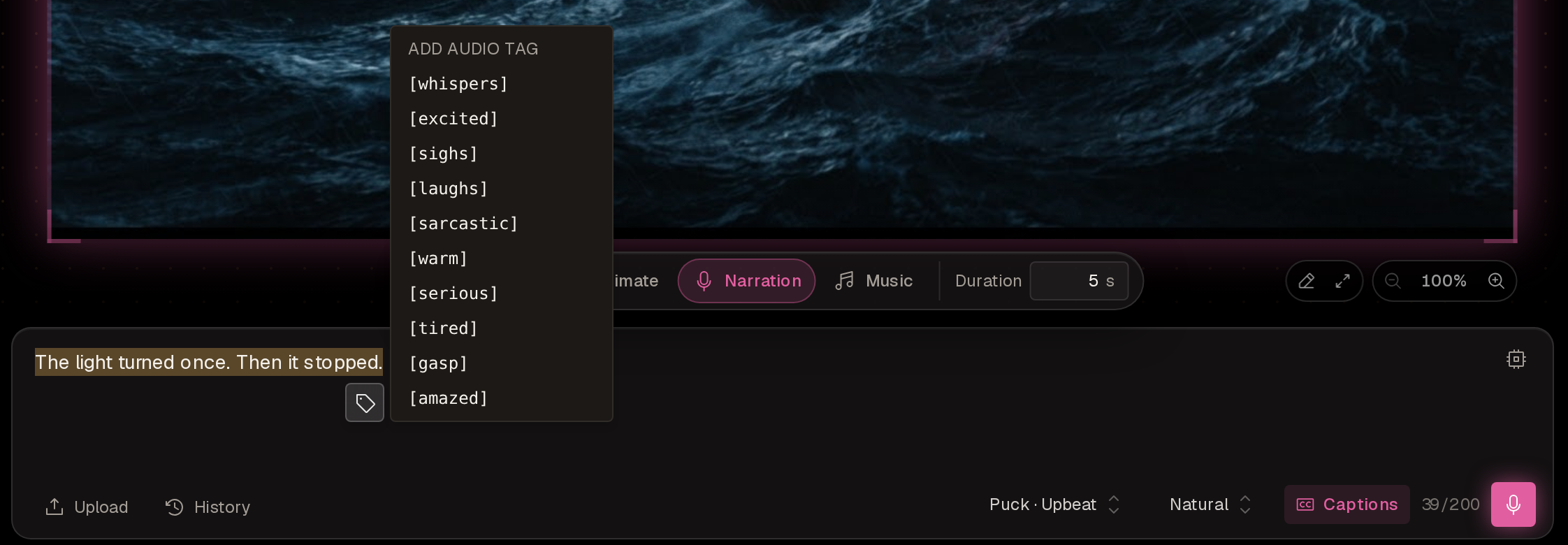
The menu holds [whispers], [excited], [sighs], [laughs], [sarcastic], [warm], [serious], [tired], [gasp] and [amazed]. To use any other tag, type it in square brackets.
Screel removes tags from the on-screen caption at render. In the editor the caption shows what you typed.
Prompting guide
Section titled “Prompting guide”Screel speaks the text as written. Direct the delivery with the voice, the style, tags and punctuation. A written direction such as say this slowly can end up spoken, and it shows in the caption.
Write for the ear
Section titled “Write for the ear”Speech runs at about 2.5 words per second, so a 5-second scene holds about 12 words.
Write numbers and codes the way they should sound: eighty-five dollars, or [slow] 4 3 2 1 for single digits. Commas, dashes and ellipses add small hesitations.
Direct a line
Section titled “Direct a line”Set the whole line with the style, then add tags where the delivery changes. A directed line has this shape:
[pacing tag] spoken text [expressive tag] spoken text [pause tag] spoken textFor example:
[cautious] The light turned once. [short pause] Then it stopped. [whispers] Nobody had climbed the tower in years.To build suspense, shift the tags across the line. To end on relief, finish on a tag such as [hope] or [positive].
A line can hold any number of tags, and only the 200 spoken characters count toward the limit. When Manan writes a line, it uses tags sparingly, about one for each moment where the delivery changes.
Choose a tag
Section titled “Choose a tag”Screel understands more than 200 tags. These are the most common:
| Controls | Tags |
|---|---|
| Emotion | [determination], [enthusiasm], [adoration], [interest], [awe], [admiration], [nervousness], [frustration], [excitement], [curiosity], [hope], [annoyance], [amusement], [aggression], [tension], [agitation], [confusion], [anger] |
| Overall tone | [positive], [neutral], [negative], [seriousness] |
| Pace | [slow], [fast] |
| Pause | [short pause], [long pause] |
| Voice sounds | [laughs], [whispers], [gasp], [sighs] |
Other English words often work as tags too, such as [cautious], [panic] or [relief]. Generate the line and listen.
Follow the tag rules
Section titled “Follow the tag rules”- Put a tag exactly where the delivery should change.
- Do not place two tags side by side. Separate them with words or punctuation, because adjacent tags can fail.
- Write tags in English, even when the line is in another language.
Write in other languages
Section titled “Write in other languages”Write the line in the language you want to hear, and keep the tags in English:
[cautious] L'ombre avança lentement. [whispers] Le document devait être caché ici. [short pause] Mais où ?Keep one narrator
Section titled “Keep one narrator”Keep one voice across a project, unless scenes clearly speak as different characters. The style can shift with a scene’s mood. To keep a standing voice choice, put it in a project instructions document, and Manan uses it without asking.