
Meet Manan
Write, build and render from a chat beside your work. Manan is the agent in the Screel editor. In a project it works on the open project only: the script and reference documents, the scenes, generated media and renders. It cannot open, list or create other projects from there. On the projects list and library pages, Manan works across your projects and documents. See Manan outside a project.
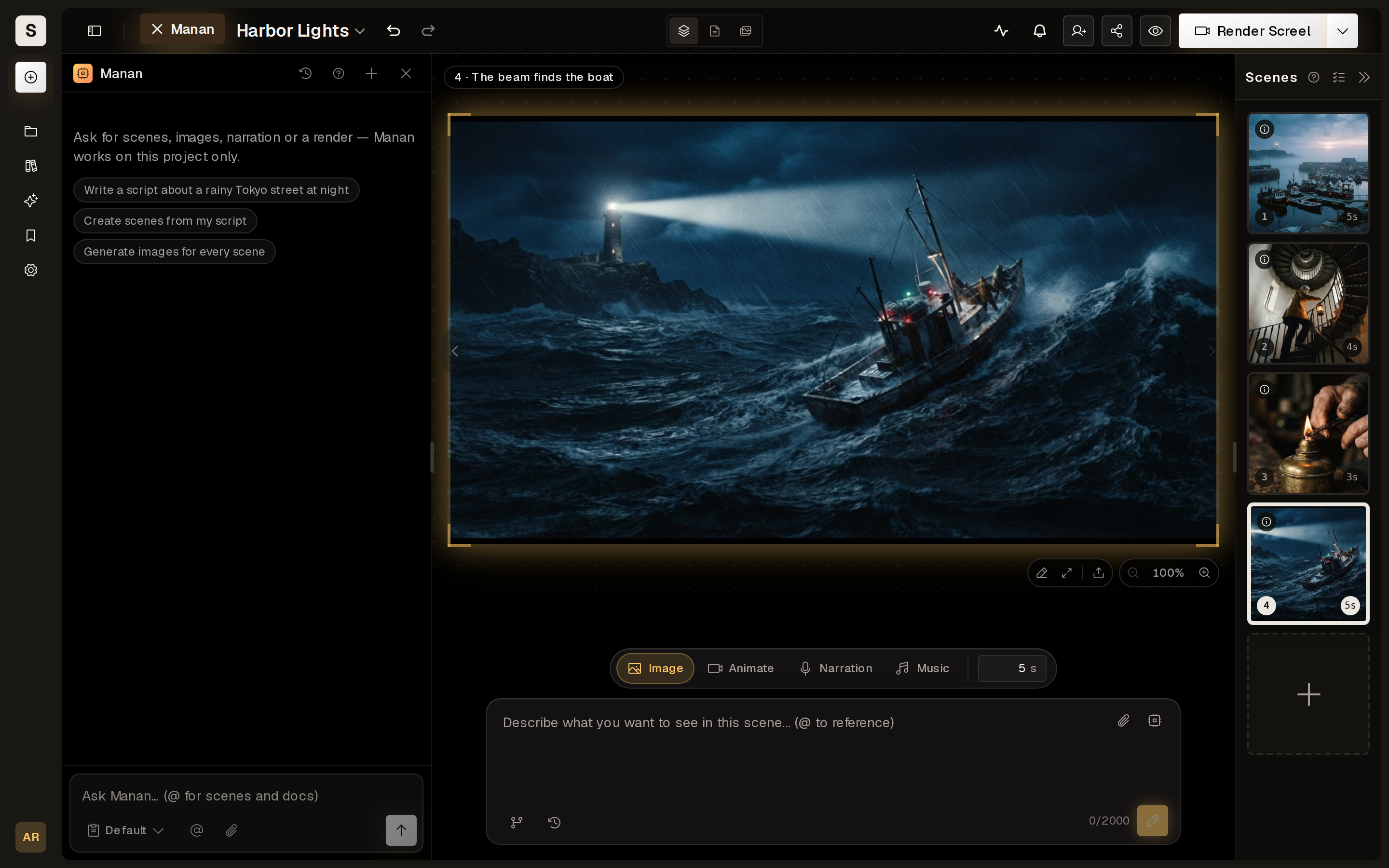
Opening Manan
Section titled “Opening Manan”- On desktop, the Manan button opens the chat panel at the left of the page. This works in the editor and on the projects list and library pages. Drag its edge to resize it. The panel stays open when you move between pages.
- On a phone or tablet, the vertical Manan tab on the right edge opens a drawer from the right. The Manan button in the top bar opens it too.
- From a scene, Ask Manan about this scene on a scene card starts a message with that scene attached.
- From a prompt field, Improve with AI on a picture, animation or music prompt hands that prompt to Manan with preset directions to pick from.
- From a document, select a passage and choose Ask to quote it into the composer.
The panel header holds the conversation picker, New chat and a close button. Each project keeps its own conversations. The first reply names a conversation, and you can rename or delete it from the picker.
With no chat chosen, your newest chat resumes if you used it in the last hour. After that a fresh chat opens. A chat with a pending card or a running turn always resumes.
What to ask for
Section titled “What to ask for”The empty state suggests three starting points:
- Write a script about a rainy Tokyo street at night. Manan writes the script document and nothing else.
- Create scenes from my script. Manan reads the script, creates scenes and links each script block to its scene. This is free.
- Generate images for every scene. Manan starts one batch of picture jobs and shows them as live cards.
“Make the screel”, or any phrasing that asks to finish the video, renders the project as it stands. Scenes without a clip render as stills.
When Manan notices other work worth doing, it says so and waits for you to ask.
How a turn works
Section titled “How a turn works”- You send a message. Manan reads the project and any documents you mentioned.
- It calls tools: it reads scenes, edits documents and starts generation jobs.
- Anything that spends credits shows an approval card first, unless you are in Auto mode or chose Allow this chat for that tool. In Default mode a write to a storyboard, whiteboard, breakdown or workflow also shows a free card. A card ends the turn until you answer. See Modes and approvals.
- Long jobs run in the background. When every job from a reply finishes, an automatic update reports the outcome and Manan reacts to it.
You can send another message during a turn, and Manan reads it between steps. See Send during a turn.
Each turn adds to your model usage, which Screel charges in credits. See Usage and limits.