
Working with Manan
Point Manan at your scenes and documents, attach files and steer a running turn from the composer.
Mention scenes, documents and pictures with @
Section titled “Mention scenes, documents and pictures with @”Type @ in the composer to pick a scene, a reference document or one picture from a document’s image bank. Open a document in the picker to pick one of its sheets, whiteboard groups, storyboard scenes or breakdown rows. In an Unreal project you can also pick a captured object. Each becomes a pill in your message. Manan receives the scene’s details, the document’s full text or the picture for that message only.
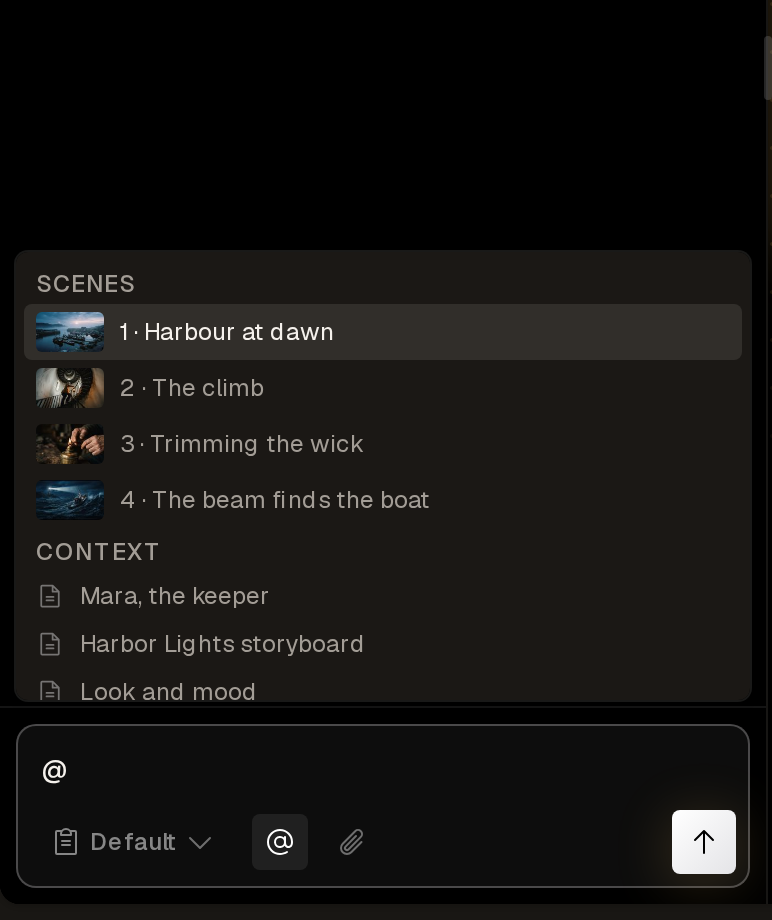
Manan treats mentioned content as source material, not as instructions. It follows what you wrote around the pill and reads the mention as reference.
Per message, Manan expands up to 6 documents, 60,000 characters of document text and 6 pictures. Manan reports a mention of a deleted document in one line and skips it.
Invoke skills with /
Section titled “Invoke skills with /”Type / in the composer to pick one of the project’s skill documents by name. The skill’s full text goes into that message. Manan uses a skill only when you invoke it. You can invoke up to 3 skills per message. See Memory and instructions to write one.
The / menu in the document editor is different: it inserts headings, quotes, dividers and pictures. See Editing documents.
Attach files
Section titled “Attach files”Attach up to 12 files per message: pictures, videos, audio and text files (.md, .txt, .pdf, .docx). They upload when you send. Manan sees the first 4 pictures of a message inline and opens the others when it needs them. It can:
- put a picture onto a scene as its still, for free;
- blend several pictures into one new picture, in one generation job;
- restore a scene’s still from that scene’s history;
- turn a video into scenes to refine, with no credits for the import;
- make an audio file the project’s music track or a workflow input.
Older attachments stay usable later in the conversation.
Paste long text
Section titled “Paste long text”A paste over 1,500 characters or 8 lines becomes a removable chip instead of filling the textarea. It reaches Manan as attached source material, such as a draft, an article or notes. Say what to do with it in your own words outside the chip. A message can hold up to 120,000 characters.
A text file arrives the same way. Choose Attach as document on a file chip to keep its pictures, or save a pasted chip as a reference document with its bookmark button.
Send during a turn
Section titled “Send during a turn”You can send a message while Manan works, and it reads the message between steps. Up to 10 messages wait, and you can edit or remove them. Press Esc or choose the stop button to stop the turn.
When a card is open, sending a message replaces the card. The composer warns you first: “This message replaces the open card.”
Question cards
Section titled “Question cards”When Manan hits a real choice, or needs a detail only you know, it asks with a question card and pauses. A card has 2 to 6 options, a free-text answer, or a picker for a scene, document or picture. Up to three questions share one card when they block the same work.
Each question also offers Something else… for a typed answer. Skip the card and Manan takes the recommended option, or its best judgement when there is none, and states what it assumed in one line. A question card expires after 24 hours.
An answer can also save work. A card can name the documents your answer writes to, and Manan then saves to them directly, even in Default mode.
Manan never uses a question card to confirm spending. Approval cards do that.
The task list
Section titled “The task list”For a job with three or more distinct steps, Manan pins a task list to the chat. It keeps the list current: the active step, the finished steps and any new steps. If a turn stops early, Continue makes Manan re-read its list and resume at the first unfinished step.
Job cards and audio rows
Section titled “Job cards and audio rows”Every generation Manan starts appears as a live card under its reply, with progress, credit cost and the result. Batches show as a grid. A finished render becomes a playable card with a modal player and a download link. Narration and music jobs are slim audio rows with play and pause, live status and a seekable scrubber. Starting one row stops any other that was playing.
Manan does not poll its own jobs. When every job from a reply has finished, an automatic update lists each as completed, failed with the reason, or cancelled. Manan confirms in a few words, addresses failures and takes the next step only if you already asked for one. Manan never restarts a failed credit-spending job without a fresh go-ahead.
Work with video and workflows
Section titled “Work with video and workflows”Attach a video and ask Manan to refine it. Manan imports the footage into scenes, refines one sample frame for you to check, then refines the clips.
Manan can also run a workflow from the chat. A dry run prices it for free. A running workflow shows a run card, and a paused node asks you for its input in the chat.
Chips in replies
Section titled “Chips in replies”Manan refers to scenes, jobs, renders and documents with live chips. A scene chip shows its number, name and thumbnail and selects the scene when you click it. A job chip shows progress. A document chip opens the document.
The context meter
Section titled “The context meter”The ring in the composer shows how full the conversation’s context is. Hover for the exact figure and what the conversation has cost so far. Choose Compact conversation there, or type /compact, to fold older messages into a summary. Long conversations also compact automatically. See Usage and limits.
Manan outside a project
Section titled “Manan outside a project”The Manan button on the projects list and library pages opens a chat that works across your projects and documents. Manan can list and open projects, create a project and write to library documents. In Default mode a write to a library document takes a free approval card.
Type @ to point the chat at a project. A focus pill in the composer shows the project Manan is working on. A chat outside a project has its own Memory. See Memory and instructions.