
Modes and approvals
Pick a mode to decide how Manan’s edits land and when it asks first. The mode picker sits in the composer. Shift+Tab cycles through the three modes. This browser remembers the choice per project. Default is the resting state.
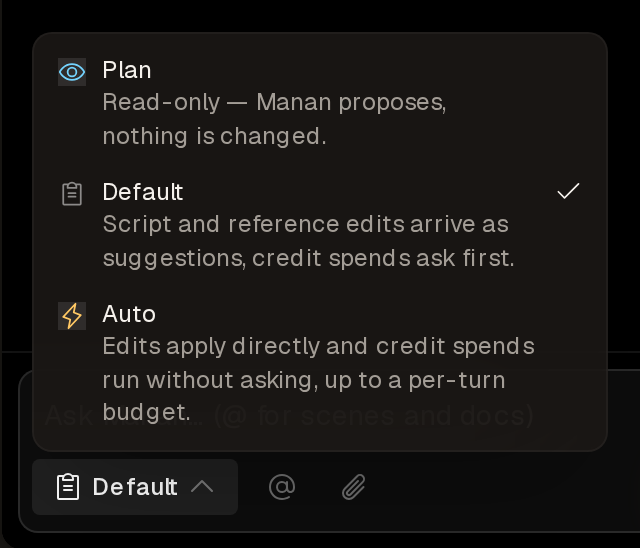
| Mode | What it means |
|---|---|
| Plan | Read-only. Manan proposes and explains: which scenes, which edits, what it would cost. It changes nothing, spends no credits and saves no memory. It can still ask a question, keep a task list, run its read-only helpers and price a workflow with a dry run. Switch out of Plan to act. |
| Default | Script and reference-document edits arrive as suggestion cards that you accept or dismiss, even edits you asked for. A new document appears at once, and its text arrives as a suggestion. A write to a storyboard, whiteboard, breakdown or workflow pauses on a free approval card, once per document per turn. An answer on a question card can let Manan save to a document directly. Scene and project edits, renames and pictures added to a document’s image bank apply directly. Credit spends ask first. |
| Auto | Edits write directly. Credit-spending tools run without asking, up to the Auto budget. Past the budget, the approval card appears. |
In every mode Manan tells you what happened: “I edited the script” only when the edit was applied, “I suggested” when it filed a card. A filed suggestion changes nothing until you accept it. See Suggestions.
Approval cards
Section titled “Approval cards”Every tool that spends credits needs your confirmation: picture generation and refinement, sheets, panel pictures, asset pictures, animation, clip refinement, narration, music, song analysis, workflow runs and upscaling. When Manan calls one, you see a card with the estimated credit cost and your balance. The card has three buttons:
- Allow once: run this call.
- Allow this chat: run it, and approve that tool for the rest of the conversation.
- Reject: do not run the call.
Rejecting costs nothing. Manan gets the call back as declined and offers a free alternative when one exists. A card ends the turn, and Manan continues once you answer. Approval cards expire after 10 minutes.
Free approval cards
Section titled “Free approval cards”Two kinds of write take a free card in Default mode:
- A write to a storyboard, whiteboard, breakdown or workflow.
- A write to a library document from a chat outside a project.
Rendering, scene edits, linking and attaching a picture you uploaded never need approval. Script and reference-document edits take no card either, and importing footage is free.
The Auto budget
Section titled “The Auto budget”Auto mode runs credit-spending tools without a card while the conversation’s estimated total for the UTC day stays within 50 credits. When the budget runs out, a call cannot be priced, or a call costs more than your balance, Manan shows the approval card.
Out of credits
Section titled “Out of credits”A turn cannot start at zero credits. Your work stays as it is. You can still render the project yourself, because a render costs no credits. See Usage and limits.